

Prepare Top Nutanix NCP-US Exam Study Guide Practice Questions Edition
Go to NCP-US Questions - Try NCP-US dumps pdf
Nutanix NCP-US Exam is a certification that is recognized globally and is highly valued by employers in the IT industry. Nutanix Certified Professional – Unified Storage (NCP-US) v6 exam certification demonstrates that the candidate has a deep understanding of Nutanix Unified Storage solutions and can effectively manage and deploy them in complex IT environments. The Nutanix NCP-US certification is also a prerequisite for many advanced Nutanix certifications.
NEW QUESTION # 27
Refer the exhibit.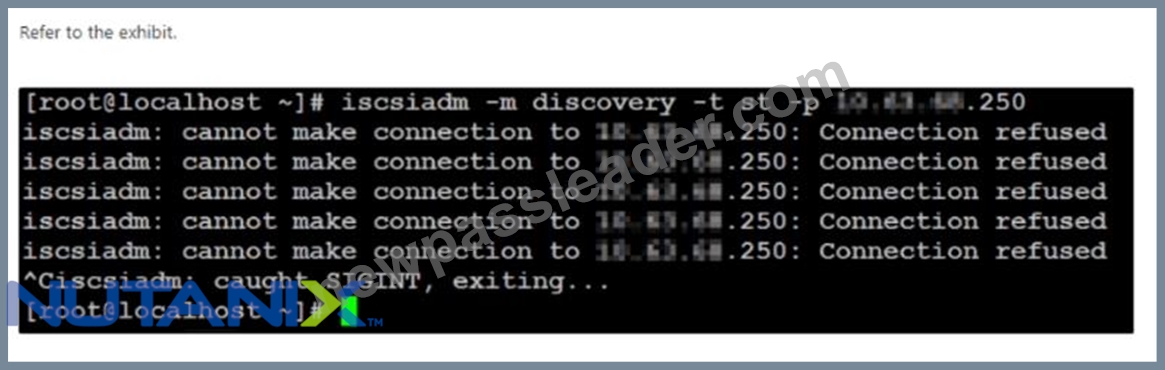
An administrator has received a support request indicating that after an update and reboot Of a Linux VM, the VM is no longer able to access the Volume Groups (VG) assigned to it.
When the administrator investigates the issue, the error message shown in the exhibit is displayed.
What are two possible reasons for the behavior? (Choose two.)
- A. The administrator has a mistake when inputting the data services IP.
- B. A firewall rule is preventing the client to access the x.x.x.250 IP.
- C. The new iscsiadm binary is not compatible with the version.
- D. The client's IQN is no longer in the whitelist of the affected VG
Answer: A,D
Explanation:
iscsiadm is a command-line tool that allows you to manage iSCSI connections and devices. The error message shown in the exhibit indicates that there is a problem with connecting to the iSCSI target at x.x.x.250.
https://stackoverflow.com/questions/29954195/error-message-from-iscsiadm-while-trying-to-connect-to-a-iscsi-drive Nutanix volume groups are collections of vDisks that can be exposed to virtual machines or physical hosts using iSCSI protocol. Nutanix volume groups have a whitelist feature that allows you to specify which clients can access them.
https://portal.nutanix.com/page/documents/solutions/details?targetId=BP-2049-Nutanix-Volumes:BP-2049-Nutanix-Volumes
1. The administrator has a mistake when inputting the data services IP. This could cause the iscsiadm command to fail to discover or login to the iSCSI target at x.x.x.250. The administrator should verify that they have entered the correct data services IP for the Nutanix volume group.
2. The client's IQN is no longer in the whitelist of the affected VG. This could cause the iSCSI target to reject or ignore the connection request from the client. The administrator should check that they have added or updated the client's IQN in the whitelist of the Nutanix volume group.
NEW QUESTION # 28
An administrator has Files deployed globally and would like to run a report to understand cold, warm, and hot data.
Which Nutanix service would allow the administrator to view the data from a single management console?
- A. Files Manager
- B. NCM Pro
- C. Data Lens
- D. Files Analytics
Answer: C
Explanation:
According to Nutanix Cloud Platform to Deliver Strengthened Data Services for Unstructured and Structured Data1, "Nutanix Data Lens is a new unstructured data governance service that provides visibility into data usage and storage capacity across Nutanix Files deployments globally." Therefore, the administrator can use Data Lens to run a report to understand cold, warm, and hot data across Files deployments.
https://www.nutanix.com/solutions/databases
NEW QUESTION # 29
Why should an administrator avoid allocating over half the RAM on a host to a FSVM?
- A. The FSVM has a set memory configuration.
- B. The FSVM would be in a single NUMA node boundary.
- C. The FSVM would experience host swapping of memory.
- D. The FSVM would cross NUMA node boundaries.
Answer: D
Explanation:
The administrator should avoid allocating over half the RAM on a host to a FSVM because the FSVM would cross NUMA node boundaries (option A).
NUMA (Non-Uniform Memory Access) is a memory architecture that divides the system memory into multiple regions that are assigned to different processors or cores.
If a FSVM crosses NUMA node boundaries, it will have to access memory from different regions, which will result in higher latency and lower performance for file operations.
To avoid this issue, the administrator should ensure that the FSVM memory allocation is within a single NUMA node boundary.
NEW QUESTION # 30
An administrator is deploying Files for multiple departments. One department works with a dynamic set of data and needs to ensure that their end users are able to get previous versions of their files.
Which feature needs to be enabled to fulfill the requirement?
- A. Self Service Restore (SSR) on the share level
- B. Protection Domain schedules on the Nutanix cluster
- C. Metro availability on the container where Files resides.
- D. Windows Previous Versions (WPS) within the guest OS
Answer: A
Explanation:
SSR allows users to restore their own files without the assistance of administrators1. It can be enabled on a share level by using a PowerShell script1.
NEW QUESTION # 31
Which setting should the administrator apply to a newly-created Objects bucket to ensure the requirements are met?
- A. Configure the bucket WORM policy with a one-year retention,
- B. Apply a bucket Lifecycle Policy with a one-year expiration.
- C. Configure a Lifecycle Policy to overwrite one-year old data in the bucket.
- D. Apply an Object versioning policy with one-year retention.
Answer: A
NEW QUESTION # 32
Which feature ensures that a host failure's impact on a Files cluster will be minimal?
- A. VM-Host affinity rules
- B. VM-VM affinity rules
- C. VM-Host anti-affinity rules
- D. VM-VM anti-affinity rules
Answer: C
Explanation:
These rules ensure that VMs are distributed across different hosts in a cluster, so that if one host fails, the impact on the VMs and their data will be minimal1. Nutanix Files also supports DFS-N (Distributed File System - Namespaces), which allows multiple file servers hosting the same data to support a common folder and provide site affinity for users2.
NEW QUESTION # 33
An administrator configured WORM on an existing Objects bucket at 4 p.m. on Monday. During the configuration, the administrator did not select Enable Version. At 8 a.m. the next morning, a ticket was submitted to update the bucket to include versioning.
What are the correct steps to make the requested change?
- A. Disable WORM and reconfigure with Enable Version and Enable WORM checked as it has been less than 24 hours since WORM was enabled.
- B. update the WORM settings to Enable Version as that setting can be turned on at any point after WORM is enabled.
- C. Create a new' bucket with Enable Version selected and migrate all data since versioning cannot be changed after 12 hours once WORM is enabled.
- D. Create a bucket with Enable Version selected and migrate all data since versioning cannot be changed immediately after WORM is enabled.
Answer: A
Explanation:
According to the Nutanix Unified Storage (NCP-US) v6 documentation, once WORM (Write-Once-Read-Many) has been enabled on an Objects bucket, versioning cannot be immediately enabled. Instead, the WORM configuration must be disabled and then re-enabled, this time with Enable Version and Enable WORM checked. Since the administrator did not select Enable Version during the initial configuration, this step is necessary in order to enable versioning.
https://portal.nutanix.com/page/documents/solutions/details?targetId=NVD-2151-Unified-Storage:data-immutability-and-versioning.html You can disable WORM within 24 hours of enabling it on a bucket1. This will allow you to change the versioning settings on the bucket.
NEW QUESTION # 34
An administrator is scheduling to upgrade Files from version 3.8.1.3 to 4.1.0.2 for all the dark sites.
After transferring the dark site bundle to the internal web server, the administrator performs an LCM inventory but cannot check off the Files upgrade to be performed.
Which component needs to be upgraded along side of the core Files components?
- A. File Analytics
- B. Files Manager
- C. Files Sender
- D. File Server Module
Answer: D
Explanation:
When upgrading Files from version 3.8.1.3 to 4.1.0.2 for all dark sites, the File Server Module component needs to be upgraded alongside the core Files components. This is because the File Server Module is a core component of Files and is responsible for file-level data services, including access control, auditing, and file sharing.
If the File Server Module is not upgraded alongside the core Files components, it can result in compatibility issues and potentially cause the upgrade to fail.
Therefore, it is recommended to upgrade the File Server Module together with the core Files components when upgrading Files.
NEW QUESTION # 35
An administrator has deployed an SMB v3 Files cluster, but needs to make the cluster able to support Multi-protocol access, Which protocol will be native?
- A. SMB
- B. S3
- C. NFS
- D. cifs
Answer: A
Explanation:
According to the Nutanix Files SMB Migration Guide1, Nutanix Files supports SMB protocol V2 and V31. SMB is a native protocol for Nutanix Files that allows file sharing between Windows clients and servers1.
NEW QUESTION # 36
An administrator is implementing a storage solution with these requirements:
Is easily searchable
Natively supports disaster recovery
Access to each item needs to be fast
Can scale to petabytes of data
users are granted access after authentication
user data is isolated, but could be shared
How should the administrator satisfy these requirements?
- A. Implement Volumes with CHAP.
- B. Configure Calm with an application per user.
- C. use Files distributed share with ABE.
- D. Deploy Objects with AD integration.
Answer: D
Explanation:
This is because Objects can provide fast access to each item using S3-compatible API which can be easily searched using metadata tags or third-party tools3. Objects also natively supports disaster recovery using replication policies1. Objects can scale to petabytes of data using erasure coding which reduces storage overhead1. Users can be granted access after authentication using AD integration which simplifies identity management1. User data can be isolated but could be shared using buckets which are logical containers for objects that can have different policies applied1.
NEW QUESTION # 37
An administrator is increasing the read performance for Splunk at their remote site, which uses Objects at the primary site for SmartStore capability. Read latency is extremely high due to WAN traversal for data, What should the administrator do to remediate this problem?
- A. Deploy another Objects instance at the remote site and configure Streaming Replication of the SmartStore bucket from the primary site.
- B. Deploy another Splunk instance at the remote site and configure Splunk Replication of the SmartStore bucket from the primary site.
- C. Deploy another Splunk instance at the primary site and configure Streaming Replication of the SmartStore bucket from the remote site.
- D. Deploy another Objects instance at the primary site and configure SmartStore Replication
Answer: A
Explanation:
According to the Nutanix Unified Storage v6 documents at nutanix.com1, Objects supports Streaming Replication which allows you to replicate data between two or more Objects clusters for disaster recovery or data locality2. According to Splunk documentation3, SmartStore is an indexer capability that uses remote object stores such as Objects to store indexed data and reduce local storage requirements4. Therefore, by deploying another Objects instance at the remote site and replicating the SmartStore bucket from the primary site, you can improve read performance and reduce WAN latency for Splunk.
NEW QUESTION # 38
When completing the Linux Client iSCSI discovery process of the Nutanix cluster Volumes target, which action should an administrator complete first?
- A. Restart iSCSI service on CVM.
- B. Ensure the iSCSI is started.
- C. Establish connection to the Volumes target.
- D. Discover the Volumes target.
Answer: B
Explanation:
To use Nutanix Volumes with Linux clients, you must install and configure an iSCSI initiator on each client." Therefore, the administrator should ensure that the iSCSI service is started on the Linux client before discovering or connecting to the Volumes target.
https://next.nutanix.com/installation-configuration-23/data-services-ip-iscsi-33804
NEW QUESTION # 39
The Files administrator has received reports from users in the accounting department that they can see folders that they don't have permission to access. The accounting department manager has requested that employees should only be able to see folders that they have permission to access.
How would a Files administrator ensure that users in the accounting share can only see folders they have permission to access?
- A. Enable Access-Based Enumeration on the accounting share.
- B. Enable Access-Based Enumeration on the File Sewer.
- C. Remove File Blocking on the accounting shares.
- D. Remove read-only access to shares users should not access.
Answer: A
Explanation:
According to Nutanix Support & Insights1, Access-based enumeration (ABE) is a Windows feature that filters the list of available files and folders on the file server to include only those the requesting user can access. ABE can be enabled on a per-share basis for SMB shares.
Therefore, if the Files administrator wants to ensure that users in the accounting share can only see folders they have permission to access, they can enable ABE on the accounting share.
https://www.nutanix.com/support-services/training-certification/certifications/certification-details-nutanix-certified-professional-unified-storage-v6
NEW QUESTION # 40
When deploying Nutanix unified Storage Objects. which two protocols are supported? (Choose two.)
- A. NFS
- B. S3
- C. SMBv3
- D. SMBv2
Answer: B,D
Explanation:
S3 stands for simple storage service and it is a widely used object storage protocol that allows you to store and retrieve any amount of data from anywhere on the web. SMBv2 stands for server message block version 2 and it is a file sharing protocol that enables access to files on remote servers. Nutanix Unified Storage Objects supports both S3 and SMBv2 protocols for data access.
https://next.nutanix.com/installation-configuration-23/ports-and-protocols-reference-chart-40249
NEW QUESTION # 41
Due to a new IP addressing plan for the vDesktops network, an administrator needs to change the Files client-side network.
Which action should the administrator perform first?
- A. Power off the FSVMs.
- B. Create a new' managed virtual network.
- C. Remove existing DNS entries.
- D. Stop the Files service,
Answer: B
Explanation:
According to the Nutanix Unified Storage v6 documents at nutanix.com1, Files uses two types of networks: client-side and server-side2. The client-side network is used for SMB and NFS access to Files shares, while the server-side network is used for internal communication between FSVMs3. To change the client-side network, you need to create a new managed virtual network on Prism Element and assign it to your FSVMs4. This will allow you to change the IP addresses of your FSVMs without affecting their connectivity to each other.
NEW QUESTION # 42
An administrator needs to deploy a new Linux log collector package which creates a directory for each monitored item. The logs would be analyzed by a Windows application.
Which action should the administrator take, that will provide the best performance and simplicity?
- A. Configure Files Analytics to analyze the collected logs.
- B. Create an Objects bucket with versioning enabled.
- C. Create a Files distributed share with multi-protocol access.
- D. Assign e Volume vDisk to the Linux collector VM,
Answer: C
Explanation:
Creating a Files distributed share with multi-protocol access would allow for easy and efficient transfer of log files between the Linux collector package and the Windows application. This would provide simplicity in terms of configuration and management, and would also ensure that the log files are stored in a distributed and highly available manner, making it easier to access them as and when required.
, Files is a software-defined scale-out file storage solution that provides a single namespace for unstructured data2. Files supports both SMB and NFS protocols, which means you can access the same share from both Linux and Windows machines3. This would provide the best performance and simplicity for your log collector package and analysis application.
NEW QUESTION # 43
An administrator is upgrading Files and receives the following error message:
failed to reach fileserver.
In which way should the administrator resolve this issue?
- A. SSH into FSVM using Internal IP and execute command cluster start
- B. SSH into the FSVM end execute command cluster restart
- C. SSH into FSVM using Internal IP and execute cluster status
- D. SSH into the FSVM and execute command minewa stop fstm
Answer: C
Explanation:
According to Nutanix Support & Insights1, "The issue might occur because of the following. Nutanix files node (fsvms) might not be up or accessible." Therefore, the administrator should SSH into FSVM using Internal IP and execute cluster status to check if the FSVM is running and reachable.
https://next.nutanix.com/how-it-works-22/upgrade-software-file-server-stuck-downloading-40231
NEW QUESTION # 44
An administrator performed an upgrade to Prism Central. However, after reviewing the configuration, Objects is enabled but was not upgraded to the latest version.
The Objects configuration is showing enabled for the environment and Prism Element has been updated on the cluster.
How should the administrator resolve this issue?
- A. reapply the Prism Central upgrade,
- B. Upgrade NCC and rerun the upgrade.
- C. Perform LCM Inventory and apply updates.
- D. Restaff Objects service and rerun the upgrade.
Answer: A
Explanation:
it seems that reapplying the Prism Central upgrade might resolve this issue. According to the Nutanix Unified Storage v6 documents at nutanix.com1, Objects is a service that runs on Prism Central and can be upgraded along with Prism Central using LCM2. However, sometimes the upgrade might fail due to network issues or other reasons3. In that case, you can try to reapply the Prism Central upgrade by following these steps4:
Log in to Prism Central as an administrator
Go to Settings > Upgrade Software
Click on Reapply Upgrade
Follow the instructions on the screen
NEW QUESTION # 45
An administrator is determining the most recent operation a user performed on the share cifs1 within the last 24 hours.
How should the administrator complete this task in File Analytics?
- A. In the Audit Trails section, search for the user and view their last operations.
- B. In the Anomalies section view the anomaly rule created for the user with an interval of 24 hours.
- C. In the Anomalis section. select Users exceed an operation count threshold an input the 24 hour range for share cifs1.
- D. In the Audit Trails section, search for the cifs1 share and view the actions on the share over the past 24-hour range.
Answer: D
Explanation:
File Analytics is a tool used for monitoring and auditing file activity within an organization's file servers. The administrator needs to determine the most recent operation a user performed on the share cifs1 within the last 24 hours. To accomplish this task in File Analytics, the administrator should go to the Audit Trails section, where they can search for the cifs1 share and view the actions on the share over the past 24-hour range. This will allow the administrator to see all the activity that has occurred on the share, including the most recent operation performed by the user.
According to the Nutanix Unified Storage v6 documents at nutanix.com1, File Analytics captures all file activity for registered file server instances and provides an audit trail for administrators2. In the Audit Trails section, you can search for the user or the share name and view their operations over a specified time range2. This would allow you to determine the most recent operation a user performed on the share cifs1 within the last 24 hours.
NEW QUESTION # 46
What is the most likely cause of an Objects bucket that is shared with multiple users to approach its assigned capacity limit?
- A. Malware infection is causing the usage.
- B. Objects store capacity includes snapshots.
- C. Some mufti-part operations are pending.
- D. Other users have written to the bucket.
Answer: D
Explanation:
According to Nutanix Objects User Guide1, an object store is a logical grouping of buckets that share a common namespace and configuration settings. A bucket is a container for objects that can be accessed by authorized applications and users using S3-compatible APIs.
Objects Storage provides a simple and scalable S3 compatible storage tier on top of your Nutanix AOS platform2. There is no limit on objects per bucket3, but there is a limit on the total capacity of an object store that can be configured during its creation or modified later4.
Therefore, if an object store is shared with multiple users, it is possible that other users have written to the buckets in the object store and consumed its assigned capacity limit.
NEW QUESTION # 47
Which two networks are required in order to deploy Objects? (Choose two.)
- A. Objects Storage Network (External)
- B. Objects Public Network (External)
- C. Objects Storage Network (internal)
- D. Objects Public Network (Internal)
Answer: A,C
Explanation:
The Objects Storage Network (internal) is a virtual network that connects all CVMs in a cluster that hosts an object store. The Objects Storage Network (External) is a virtual network that connects external clients to an object store. The Objects Public Network (Internal) and (External) are not required for deploying Objects.
https://hyperhci.com/2019/09/18/nutanix-objects-storage-service/
NEW QUESTION # 48
The exhibit shows a Prism Pro scenario result created by an administrator for a Nutanix cluster.
The physical nodes in the cluster include these characteristics:
144 GHz CPU power
3 Tib RAM
41.63 TiB storage
The total target workload requests are:
5 Ghz CPU
10 GB RAM
40 TiB storage
What should be changed to have a good capacity runway at least for the next 6 months?
- A. Add new physical node to the configuration.
- B. Increase the storage capacity for physical nodes.
- C. Review storage capacity requested by the workload.
- D. Change the date of physical rode availability.
Answer: C
Explanation:
According to the Nutanix Support & Insights website1, capacity runway is an estimate of how long your cluster can support its current workload before running out of resources2. The exhibit shows that your cluster has a storage runway of only 1 month, which means you will run out of storage space soon. However, your CPU and memory runways are much longer (more than 2 years), which means you have plenty of CPU and memory resources available. Therefore, it might be possible to reduce the storage capacity requested by your workload or optimize your storage utilization to extend your storage runway. Alternatively, you could also increase the storage capacity for physical nodes or add new physical nodes to the configuration, but these options might be more costly and complex.
NEW QUESTION # 49
An administrator is upgrading Files. When running the preupgrade check, the following message is generated:
Fileserver in HA state
Which two steps should the administrator take to resolve this error message? (Choose two.)
- A. Check if Stargate services are running,
- B. Check if Zookeeper services are running.
- C. Check for alerts for NVM being down.
- D. Verify FSVM is booted and not stuck.
Answer: B,D
Explanation:
These steps are based on a guide from Nutanix on how to troubleshoot pre-upgrade checks failure for Nutanix Files1. The guide states that one possible cause of this error message is that Nutanix files node (fsvms) might not be up or accessible1. The guide also suggests checking if Zookeeper services are running on all FSVMs as part of the troubleshooting process1.
NEW QUESTION # 50
A company is implementing Files and has these requirements:
Six departments
Each department needs to access its own shared namespace
18,000 users
Given the nature of the workload, the administrator has decided to scale up by adding the maximum amount of vCPU and RAM.
What should the administrator implement to satisfy the stated requirements?
- A. Six distributed shares with 3,000 concurrent sessions.
- B. Six standard shares with 3,000 concurrent sessions.
- C. The Admittatur should create a standard share.
- D. The administrator should create a distributed share.
Answer: A
Explanation:
According to Nutanix Files :- Exports and Shares Basics1, "A distributed share is an SMB share or NFS export that can be hosted by multiple FSVMs. A distributed share can handle more concurrent sessions than a standard share." Therefore, the administrator should create six distributed shares for each department to access its own shared namespace and handle 3,000 concurrent sessions.
https://www.nutanix.com/products/files
NEW QUESTION # 51
Which administrator action within Files will enable the monitoring of users' files for malware and viruses?
- A. Leave the threat detection to the local machine's antivirus application.
- B. Install ClamAV on each FSVM,
- C. Connect to an ICAP server.
- D. Install antivirus on a server and mount the share for scan.
Answer: C
Explanation:
ICAP stands for internet content adaption protocol and it is a standard protocol that allows you to integrate file servers with security products. Nutanix Files supports third-party vendors that use ICAP servers to scan files for malware and viruses.
https://www.nutanix.com/sg/support-services/training-certification/certifications/certification-details-nutanix-certified-professional-unified-storage-v6
NEW QUESTION # 52
......
Free Nutanix Certified Professional (NCP) NCP-US Exam Question: https://itcert-online.newpassleader.com/Nutanix/NCP-US-exam-preparation-materials.html